How to reduce SaaS churn: a practical playbook
Most writing about reducing SaaS churn is aimed at companies that employ someone whose entire job is churn. Health scores, CSM playbooks, quarterly business reviews. If you are two people shipping a self-serve product billed through Stripe or Lemon Squeezy, none of that applies to you this year.
This is the other version. It assumes no retention function, no analyst, and one week of effort. Everything below is a mechanism you can build yourself, with the actual API calls where they matter and a list of things to skip.
First, work out whether this is even your biggest problem
Before spending a week on churn, spend ten minutes on arithmetic. The churn calculator does the version of this maths that matters, which is what your current rate costs you over a year and what a partial recovery would be worth.
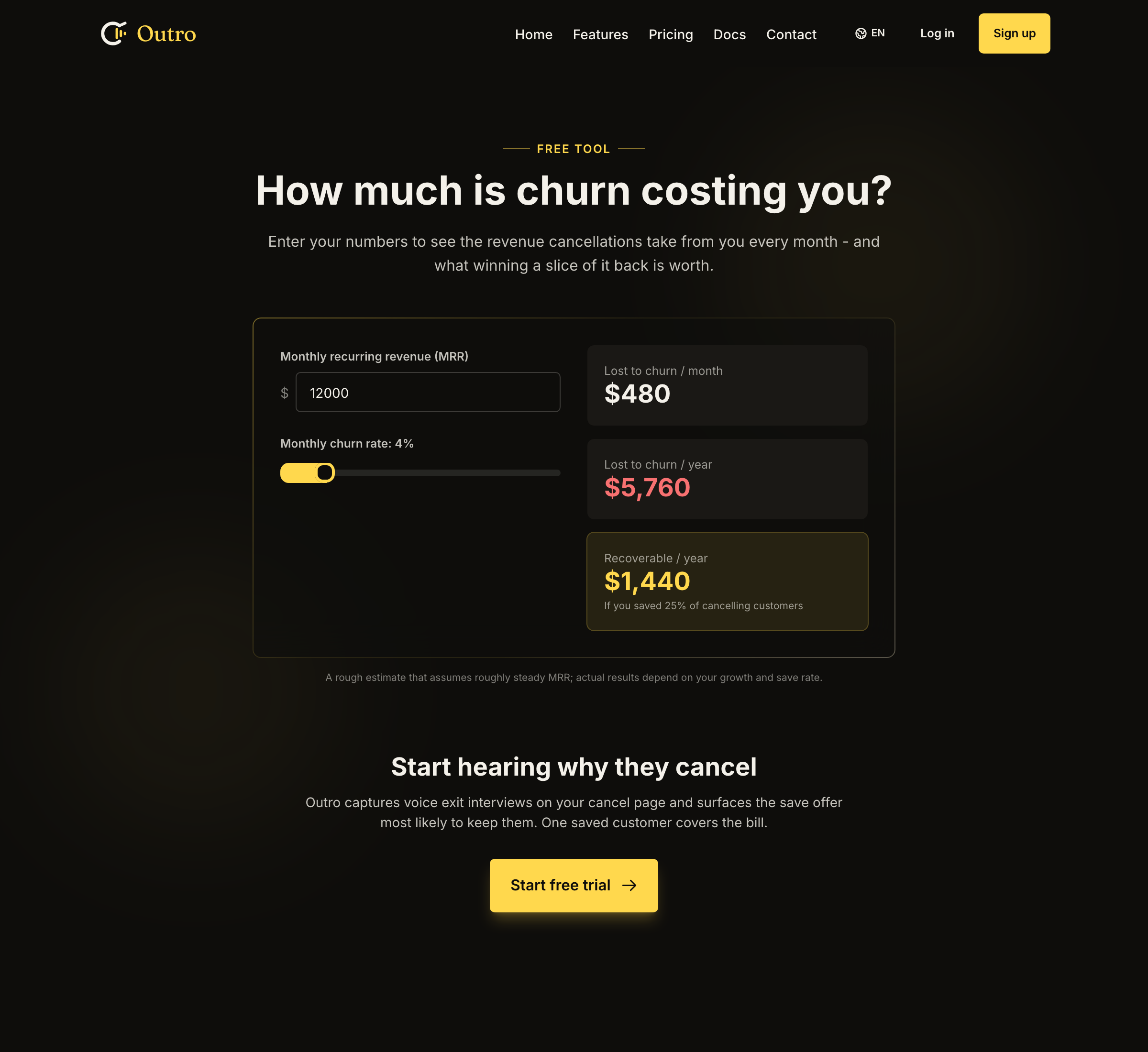
At $12,000 MRR and a 4% monthly churn rate it reports $480 lost per month, $5,760 lost per year, and $1,440 per year recoverable if you save a quarter of the customers who try to cancel. The tool says plainly that this is a rough estimate assuming roughly steady MRR, so read the shape rather than the precision. The monthly figure looks survivable and the annual figure usually does not, which is why churn gets deferred month after month.
Run your own numbers first. If the annual figure is smaller than a week of your time, go build features instead.
Two measurement notes before you start:
- Track revenue churn, not just customer churn : losing ten $10 accounts and losing one $1,000 account are both churn and are not the same problem. If you only count logos, your biggest losses hide inside your smallest number.
- Segment by cohort age : customers who cancel in month one never onboarded, and customers who cancel in month fourteen had their needs change. Averaging those produces a rate that describes nobody.
Day 1: split voluntary from involuntary churn
This is the most important cut, and the one most small teams skip.
Involuntary churn is failed payments. Expired cards, insufficient funds, a bank declining a cross-border charge. The customer never decided to leave and may not even know they left.
Voluntary churn is a customer clicking cancel on purpose.
These need different mechanisms and no single tool covers both. A cancellation flow, including Outro, cannot touch involuntary churn at all, because there is no cancellation event to intercept. Nobody clicks anything. The subscription simply stops paying.
So handle it with your billing provider's own features. Stripe has revenue recovery with retry schedules and card-update emails, and Lemon Squeezy handles dunning on its side of the checkout. Turn those on, verify the emails send from a domain you control, then set involuntary churn aside. It is a configuration problem rather than a product one, which makes it the cheapest win here.
The rest of the week is voluntary churn.
Day 2: capture the reason in words, not categories
You cannot reduce churn you do not understand, and the standard instrument for understanding it is a dropdown with five options. That dropdown will lie to you, consistently and in one direction.
A dropdown asks a customer to compress a situational frustration into your vocabulary, and "Too expensive" is the socially acceptable option, so it absorbs everything nearby. Real price sensitivity, "I never finished setting it up", "the feature I needed was missing", and "my budget got cut" all arrive as the same word, and they need four different responses.
So ask in the customer's own words at the moment they cancel, the one moment they are both maximally honest and still technically your customer.
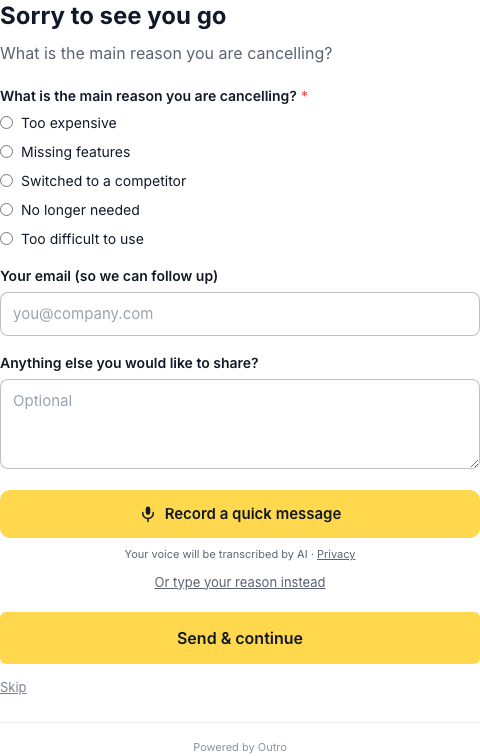
Notice that the structured reasons are still there, since they cost nothing and make aggregate reporting trivial. What changes the data quality is the recording option next to them, plus the fact that skipping stays visible. A required question at the cancellation moment produces a resentful shrug of an answer.
If you are writing the questions yourself, there is a set of exit survey questions and templates worth stealing from, and the case for voice over text at the exit covers why spoken answers come back longer and more specific.
Whatever you build, classify the free-form answers into a small fixed taxonomy so you can count them. Outro uses seven buckets, and the list is a reasonable starting point for a home-built version too, since each maps onto a distinct response. These are the exact identifiers, which matter if you build automation on a CSV export:
too_expensive: the objection is budget or value for money.missing_features: a capability gap blocked the job they hired you for.not_using: low usage, no longer needed, or simply forgotten about.too_complex: onboarding or interface friction, sometimes fatal in week one.technical_issues: bugs, outages, something that broke and stayed broken.switching: a competitor won, the most commercially valuable answer to record accurately.other: no clear product reason, including an unintelligible answer or something outside these categories such as the business shutting down.
That last bucket earns its place. Without it, a classifier forced to choose among six will push genuinely unclassifiable answers into whichever bucket fits least badly, and you will read the result as signal.
Seven buckets is enough. Fifteen means you will never have enough responses per bucket to act on any of them.
Day 3: build four offers, not one
Once you know the reason, respond to that reason. A blanket discount shown to everyone is the default because it is easy, and it does real damage, since it teaches customers that threatening to leave is how they get a lower price and destroys your ability to tell a price-sensitive customer from someone who learned the trick.
Four offers cover most of the taxonomy above, and here is what each costs to implement.
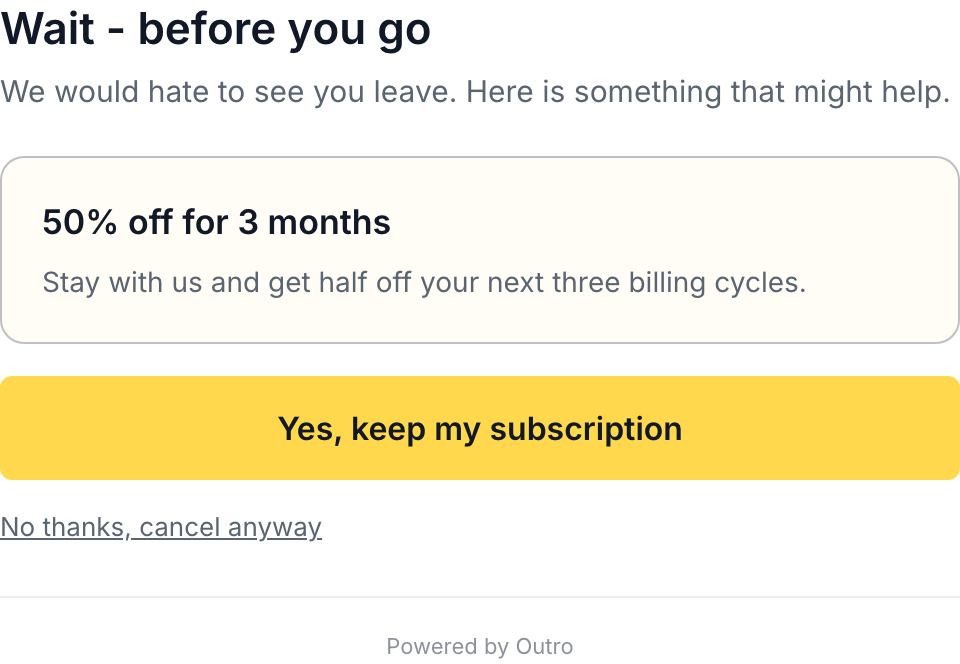
Two details there are worth copying regardless of tooling. The offer is time-boxed rather than open-ended, so it has a known cost and a natural review point. And the decline path is plain text directly underneath, not hidden behind a second confirmation, because someone determined to leave will leave either way and the only variable left is how they describe you afterwards. There is a wider survey of cancellation flow examples if you want the patterns side by side.
Pause, for not_using. Stripe supports pausing via pause_collection, which keeps the subscription alive while it stops invoicing.
const stripe = require('stripe')(process.env.STRIPE_SECRET_KEY);

await stripe.subscriptions.update(subscriptionId, {
  pause_collection: {
    behavior: 'void',
    resumes_at: Math.floor(Date.parse('2026-11-01') / 1000),
  },
});
In this code, you set behavior to void so invoices generated during the pause are voided rather than collected later, and resumes_at to a Unix timestamp for the date billing should restart. The secret key comes from the environment, never from source. The customer keeps their data and you keep a relationship that restarts without a new signup decision. A pause is deferred revenue rather than saved revenue and some never resume, so report it separately. It still beats a cancellation, because a paused customer can be reminded and a cancelled one has to be reacquired.
Discount, for too_expensive. Also a subscriptions.update call, passing discounts or coupon with a coupon you created in advance.
await stripe.subscriptions.update(subscriptionId, {
  discounts: [{ coupon: process.env.STRIPE_SAVE_COUPON_ID }],
});
The code above attaches an existing coupon to a live subscription, so create the coupon once with a fixed duration and reference it by ID from configuration. Creating coupons on the fly per cancellation leaves a pile of one-off discount objects nobody can audit later.
Downgrade, for "this plan is more than I currently need". A price swap on the subscription item.
const sub = await stripe.subscriptions.retrieve(subscriptionId);

await stripe.subscriptions.update(subscriptionId, {
  items: [{ id: sub.items.data[0].id, price: process.env.STRIPE_PRICE_STARTER }],
  proration_behavior: 'create_prorations',
});
In this code, you retrieve the subscription to get the existing item ID, then swap that item's price for the lower tier. Setting proration_behavior to create_prorations keeps the arithmetic honest instead of silently gifting or double-charging the rest of the period. A downgrade turns a total loss into partial retained revenue, which is why it belongs on the cancel screen and not only in account settings.
On Lemon Squeezy, expect one gap. Subscription changes go through PATCH /v1/subscriptions/:id, and the request must use the JSON API content type or it will be rejected.
curl -X PATCH "https://api.lemonsqueezy.com/v1/subscriptions/$LS_SUBSCRIPTION_ID" \
  -H "Authorization: Bearer $LEMONSQUEEZY_API_KEY" \
  -H "Content-Type: application/vnd.api+json" \
  -H "Accept: application/vnd.api+json" \
  -d "{\"data\":{\"type\":\"subscriptions\",\"id\":\"$LS_SUBSCRIPTION_ID\",\"attributes\":{\"variant_id\":$LS_TARGET_VARIANT_ID}}}"
The code above downgrades by pointing the subscription at a different variant, with the API key and both IDs read from environment variables. The header to watch is Content-Type: application/vnd.api+json, since a plain application/json request fails against this endpoint. Pause lives on the same endpoint with a different attribute, documented in the Lemon Squeezy subscriptions API. Discounts do not, because the Lemon Squeezy API cannot apply a discount to an existing subscription, so offering one there needs a manual step and something that tracks the promise until it is kept.
Day 4: define a save honestly, before you start counting
This step separates a retention system from a number that makes you feel good. If you count a save the moment someone clicks "keep my subscription", your save rate will look excellent and mean little. Some of those customers cancel two days later, and some accept a discount then churn as soon as it expires.
Outro counts a save only after a 14-day grace window, and only if the subscription is still live at the end of it. Hold your own implementation to the same standard. It is a few lines of logic and one delayed check against your billing provider, and it is the difference between knowing your recovery rate and guessing.
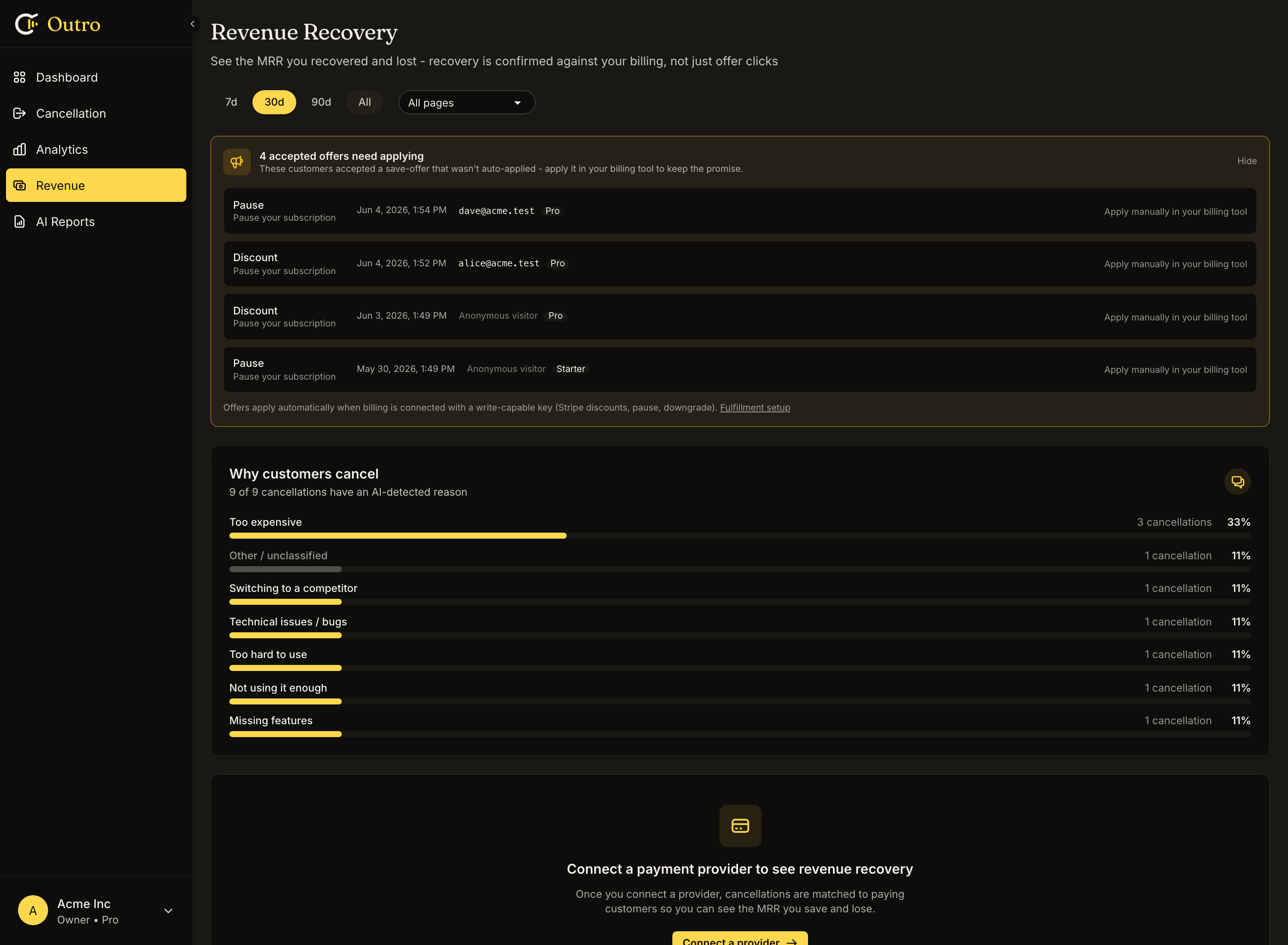
That screenshot is from a test account, so read it for structure rather than results. It shows the "connect a payment provider" empty state, because no provider is linked, plus the queue of accepted offers waiting to be applied by hand. The queue is the part to internalise. An accepted offer that never reaches the billing system is worse than no offer, since you made a promise and broke it at the exact moment the customer was deciding whether to trust you again.
Day 5: one weekly habit, and stop there
Churn work fails from ambition more often than from neglect. Do not build a dashboard you will check twice. Build one recurring five-minute review.
Outro sends a Monday digest email covering who left and why, MRR at risk, MRR saved, the top reasons, and how the offers performed. If you are rolling your own, that list is the right scope for a weekly cron job. A digest beats a dashboard because it arrives whether or not you remember it exists.
What the data looks like once it accumulates
The output of this loop is not a feeling, it is a ranked list you can hand to specific people.
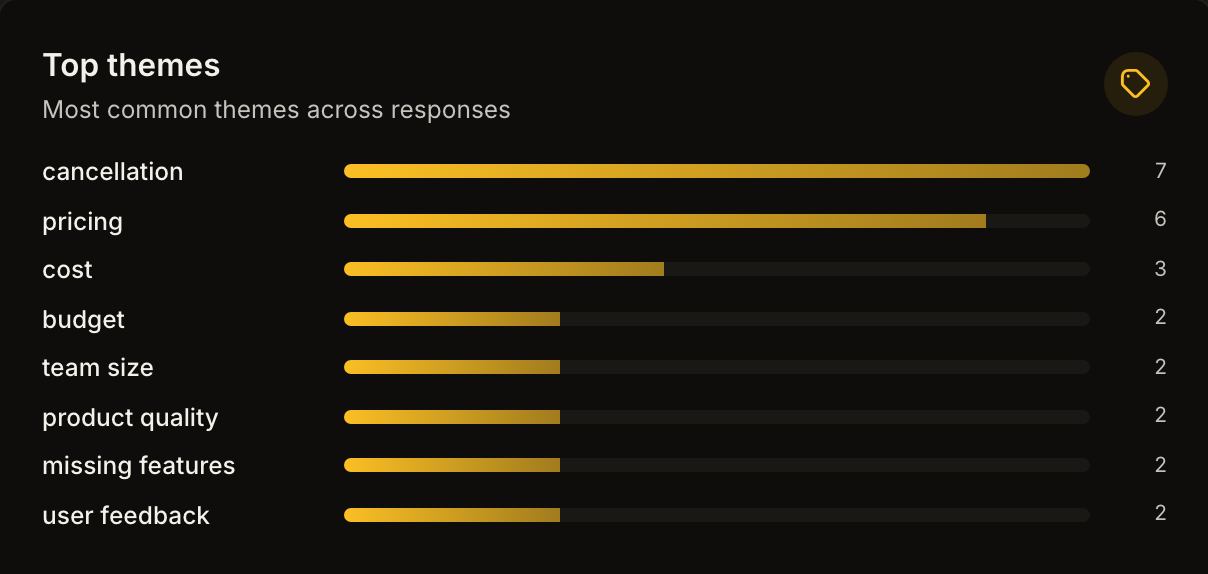
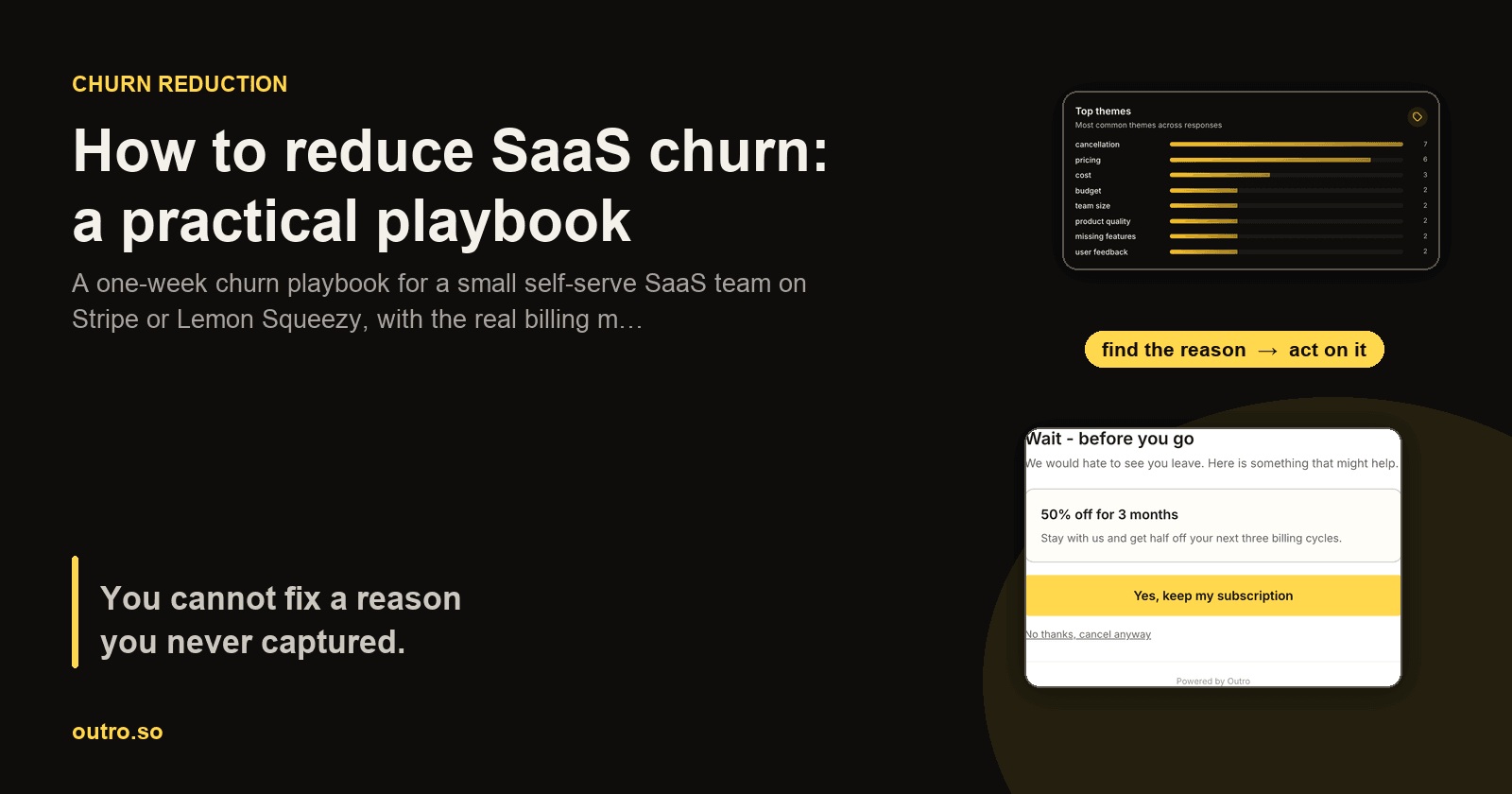
Those bars are real extracted themes across sixteen recorded exit interviews, with counts of cancellation 7, pricing 6, cost 3, budget 2, team size 2, product quality 2, missing features 2, and user feedback 2. One caveat, which is that this is sixteen responses on a test account, so treat the ordering as illustrative and ignore the shape of any trend line drawn through it. A real account accumulates these over months.
The per-response summaries are where the action lives. Two real ones from that run read "The user expresses concern about pricing being a significant issue for their small team." and "The user experienced confusion during setup and struggled with widget embedding and offer configuration."
Look at what each routes to. The first is a pricing-tier problem, most likely a jump too steep for very small teams, so it goes to whoever owns the pricing page. The second is an onboarding problem with two named steps, so it goes to product. Neither is "reduce churn". Both are a task somebody can finish this week, which is the whole value of the exercise. For why stated reasons and real reasons diverge, see why SaaS customers cancel.
Common mistakes
Trusting a client-side parameter when fulfilling an offer. If your flow redirects back to your app with something like ?outro_offer=discount, that parameter came from the browser and anyone can type it. Before applying anything, verify server-side that this customer really is mid-cancellation according to your own records, and cap how many times a given offer can be redeemed. It is easy to miss because the happy path works fine.
Averaging voluntary and involuntary churn together. You will end up fixing a card-expiry problem with product changes, or a product problem with retry logic.
Blocking the cancellation on your own data collection. If transcription, classification, or an offer lookup is slow, the cancellation still has to complete. Learning why someone left is your problem, not theirs.
Offering a discount to someone who told you a feature was missing. A coupon does not add the feature. It converts a clear product signal into a smaller invoice and buys one more month of the same conversation.
Building the offers before reading the answers. Teams that design offers first build for the reason they assume dominates. The recordings usually disagree. Capture for two or three weeks, then decide.
What this playbook deliberately leaves out
- Failed-payment recovery : handled by your billing provider, not by a cancellation flow. Outro does not do dunning.
- Health scores and usage-based churn prediction : useful at a size where someone can act on a daily alert list. Below that, the alerts pile up unread.
- Deep integration plumbing : Outro's current egress is the weekly digest plus CSV export. There is no public REST API, no webhooks, no npm package, and no Zapier, Make, n8n, or Slack integration, so if your plan depends on piping cancellation events elsewhere automatically, plan for the CSV.
- Win-back campaigns : a real tactic, and a separate project. Do the exit first, since it tells you what a win-back email should say.
The short version
Split involuntary churn out and let your billing provider handle it. Ask one question at the cancellation moment and let people answer in their own words. Classify into a small fixed taxonomy. Build four reason-matched offers using pause, discount, downgrade, and an honest no. Count a save only after a grace period. Read one digest a week. That is the whole loop, and it fits in a week if you do not gold-plate any single step.
Outro is the version of this we build and run ourselves, a cancellation flow with voice exit interviews for self-serve SaaS on Stripe or Lemon Squeezy, with AI classification and reason-matched offers applied before the cancellation completes. Plans are $0, $29, $79, and $199 per month. Every screenshot above is the real product rather than a mockup, including the empty state on the revenue recovery page, and the churn calculator is free to use without an account.
Hear why your customers really cancel
Outro captures voice exit interviews on your cancel page, detects the real reason with AI, and shows the save offer most likely to keep them.
Start free trial