Why SaaS customers really cancel (and how to find out)
Here is a sentence a real tester spoke into a cancellation flow.
"the price is honestly the whole problem for us, we are a team of three and the next tier up costs more than our entire tooling budget for the quarter."
Now here is what a dropdown would have recorded from the same person. Too expensive. Two words, one row in a spreadsheet, and every actionable detail gone.
The sentence is not a complaint about your price. It is a complaint about the size of the jump between two of your tiers, from someone who is three people and does not fit the tier above. That is a pricing-page problem. The dropdown answer, "too expensive", points you at a discount instead, which is the wrong fix and an expensive one. Same customer, same reason code, opposite conclusions.
This article is organized around the seven reason categories that Outro classifies cancellations into. The taxonomy is deliberately small and fixed, because a small fixed set is what makes counting possible. The argument is that the categories only become useful when something underneath them preserves the sentence the customer actually said.
The seven reasons, and what each one actually hides
Outro sorts every cancellation into one of seven reasons. The set does not change and you do not configure it.
- Too expensive : the customer is telling you something about price, but almost never about the absolute number. It is usually the gap between tiers, a budget that got cut, or a price that felt fine until usage dropped. Recorded as a category it looks like one problem. Recorded as a sentence it splits into three, with three different owners.
- Missing features : the load-bearing word is which. One missing integration that blocked a whole workflow is a roadmap decision. A nice-to-have that came up once is noise. The category treats them identically.
- Not using it : nobody was harmed by your product, they simply never built it into their week. This is the reason a customer has the least incentive to volunteer and the most incentive to report as "too expensive", since paying for something you never open genuinely feels overpriced.
- Too hard to use : friction that stopped the customer before the value did. Setup, configuration, a concept in your UI that does not match the concept in their head. Distinct from "not using it" because here they tried.
- Technical issues : bugs, outages, things that broke trust. The most fixable category and the one most worth reading verbatim, because you need the reproduction path and not the count.
- Switching : they went somewhere else. The category is nearly useless on its own. Where they went and what pulled them is the entire signal.
- Other : no clear product reason at all, including an unintelligible answer or something genuinely outside the other six, such as the business shutting down. A taxonomy without this bucket is worse than one with it, because a classifier forced to choose will file noise under whichever real reason fits least badly.
The underlying values are stored as identifiers rather than the display labels above, and they do not always read the way the label does. The full set is too_expensive, missing_features, not_using, too_complex, technical_issues, switching and other, so "Too hard to use" arrives as too_complex and "Not using it" as not_using. Worth knowing before you build a report on a CSV export.
Notice that four of the six real reasons can plausibly be reported by the customer as the first one. That asymmetry is the whole problem with dropdowns, and it predicts that a checkbox survey will skew toward price for reasons that have very little to do with your price.
Why "too expensive" absorbs everything else
A dropdown asks the customer to do a translation job on your behalf. They have a specific situation, and you hand them five predefined buckets and ask them to pick the closest one. That is a lossy compression step, and the customer is not motivated to do it carefully, because they are leaving.
The bucket they pick is the socially acceptable one. Saying "too expensive" costs the customer nothing, since it implies no criticism of the product, no admission that they never got around to setting it up, and no obligation to explain. Compare that with clicking "too hard to use", which reads as an accusation, or "not using it", which reads as an admission. Given a free choice, people route around the awkward options.
So "too expensive" quietly absorbs at least three unrelated cases, including "I never set it up", "the one feature I needed was missing", and "my budget got cut". Those three demand completely different responses from you. Pooled into one category, they average into a recommendation to lower your price, which is the one action that helps none of them.
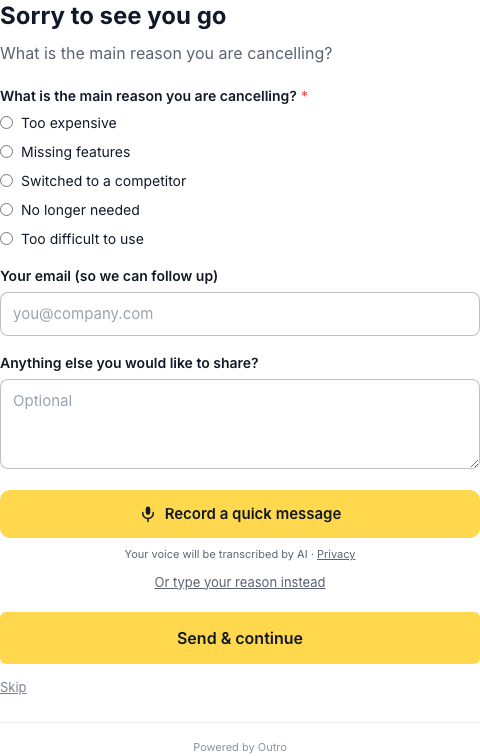
Outro's cancel page keeps the radio buttons and adds the voice option next to them, which is a deliberate compromise rather than a purist stance. The buttons give you a category for every cancellation, including from customers who will not talk. The voice answer gives you the sentence behind the category for the ones who will.
Mechanically it is a short spoken question in place of the cancel button. The answer is transcribed and classified as it arrives, and a matched offer appears before the cancellation completes. The recording is transcribed on the fly rather than kept as a playable audio file, though the transcript and the analysis derived from it are stored like any other customer record, and the page shows the line "Your voice will be transcribed by AI" before recording. That consent line is fixed and not configurable, which is the right default for something that captures a customer's voice at the least generous moment of the relationship. For a broader look at the format, see AI exit interviews.
What the reasons look like as real output
Below is the "Needs attention" panel from a live run. Every summary in it was generated from an actual spoken response.
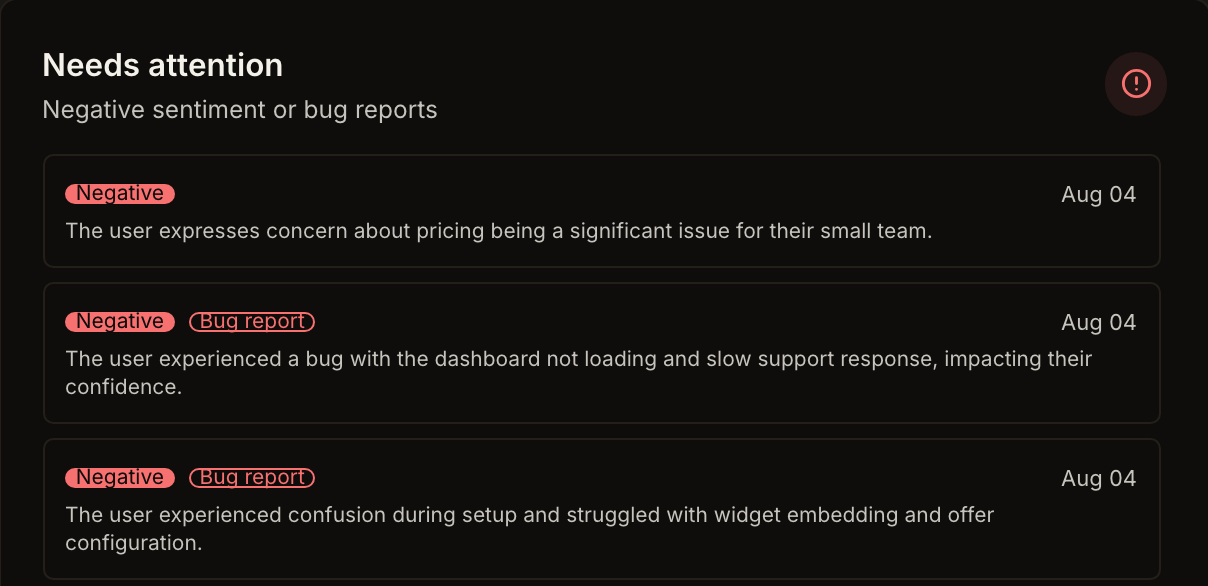
Read the three summaries as instances of the taxonomy rather than as prose.
"The user expresses concern about pricing being a significant issue for their small team" is the summary generated from the spoken sentence at the top of this article. It lands in the price category and carries the qualifier that matters, which is for their small team. A dropdown would have given you the category with the qualifier deleted.
"The user experienced a bug with the dashboard not loading and slow support response, impacting their confidence" is a technical issues case naming two separate failures. One is a bug, one is a support latency problem, and they belong to different people on your team. A single reason code would have forced the customer to drop one.
"The user experienced confusion during setup and struggled with widget embedding and offer configuration" is a too-hard-to-use case pinned to a specific step. Not "the product is confusing" but confusion during setup, specifically around embedding and offer configuration. That is a ticket you can open this afternoon.
None of the three could have been reconstructed from a checkbox, and all three are the difference between knowing your churn rate and knowing what to change.
Reason classification and feedback classification are two different things
This trips people up, so keep the two apart. Outro runs two independent classification systems over each response.
The first is the seven-value churn taxonomy above, which answers why the subscription ended. The second is a feedback classification, covering Bug report, Feature request, Praise, Question and Other, which answers what kind of message this is. On top of that, each response carries a sentiment of Positive, Neutral, or Negative.
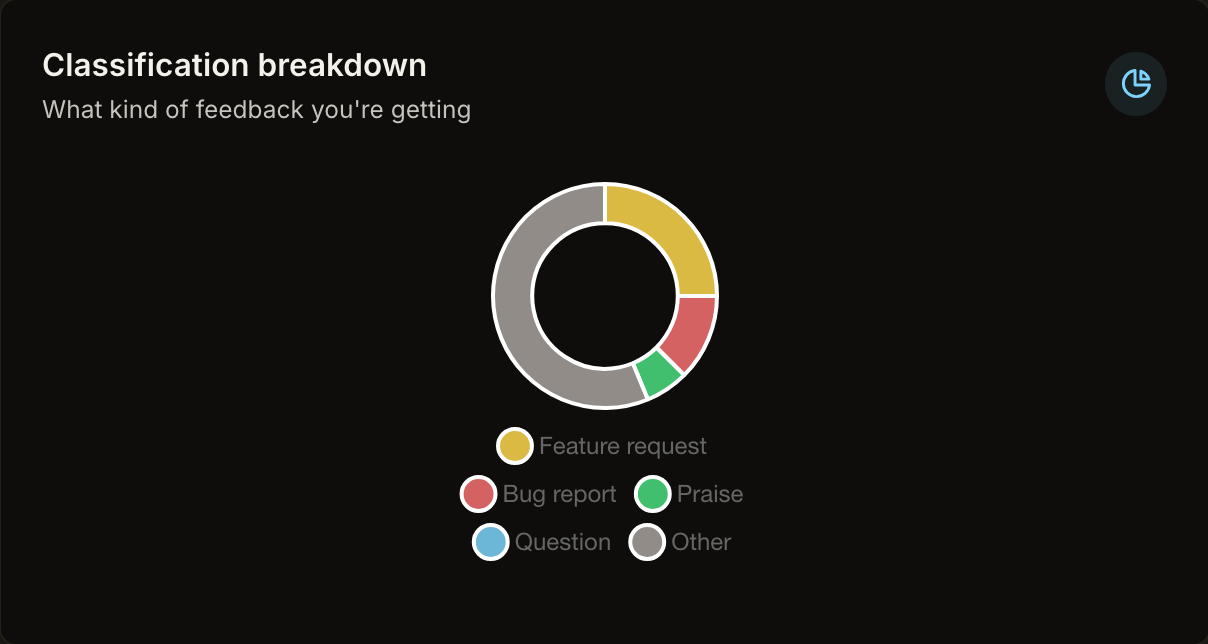
The two systems do not collapse into each other. A Bug report pairs naturally with technical issues, but it can just as easily sit under "not using it" when the bug is why they stopped opening the product two months ago. A Feature request can arrive attached to a price reason, since "the tier that has what I need costs too much" is genuinely both.
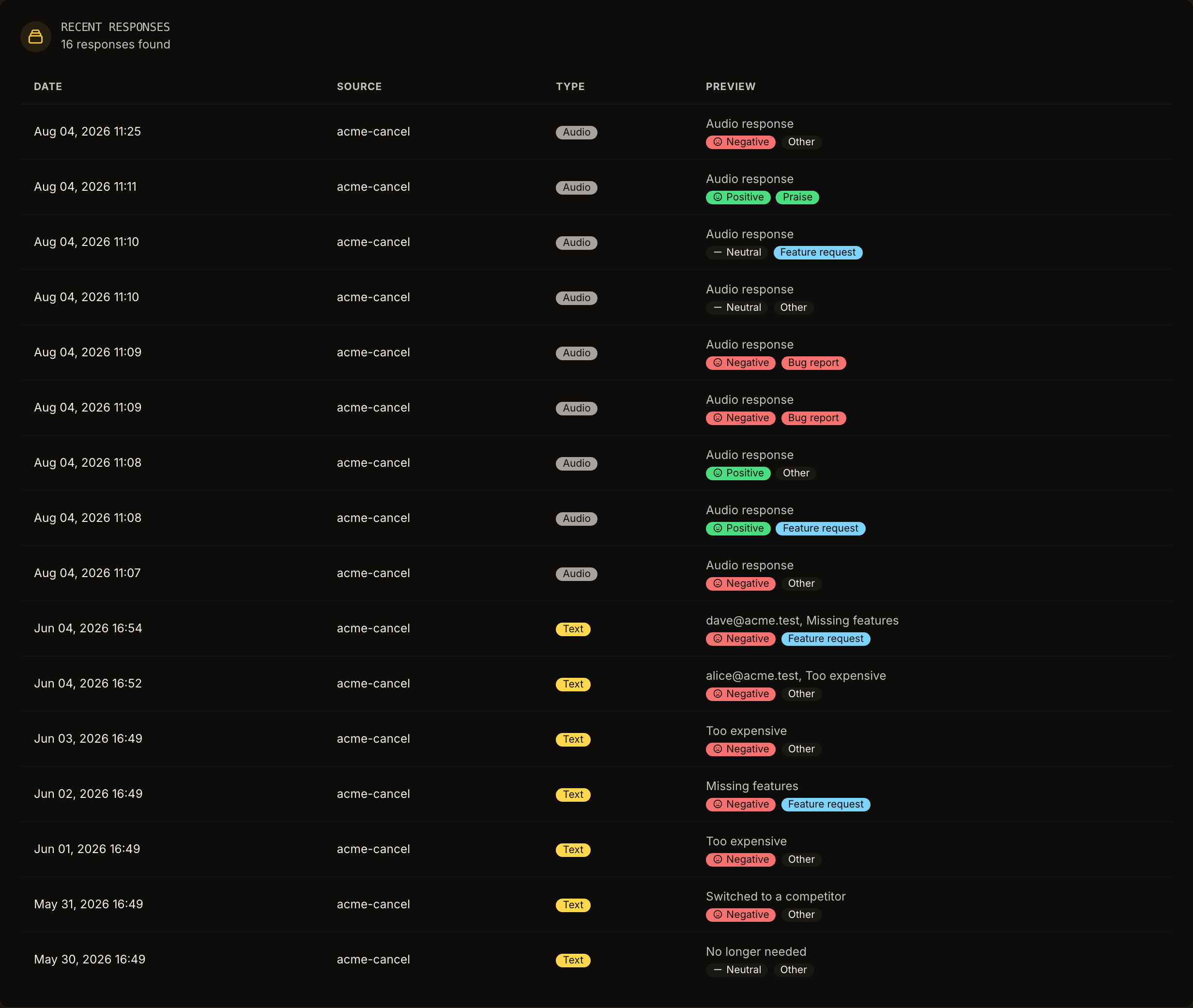
The Recent Responses table is where the two systems sit side by side. Scan the sentiment and classification tags together rather than one at a time, because the combinations are more informative than either column alone. A Feature request with Neutral sentiment is a roadmap input. The same request with Negative sentiment is a customer who felt ignored, which is a different conversation and often a saveable one.
Themes turn the categories into a priority list
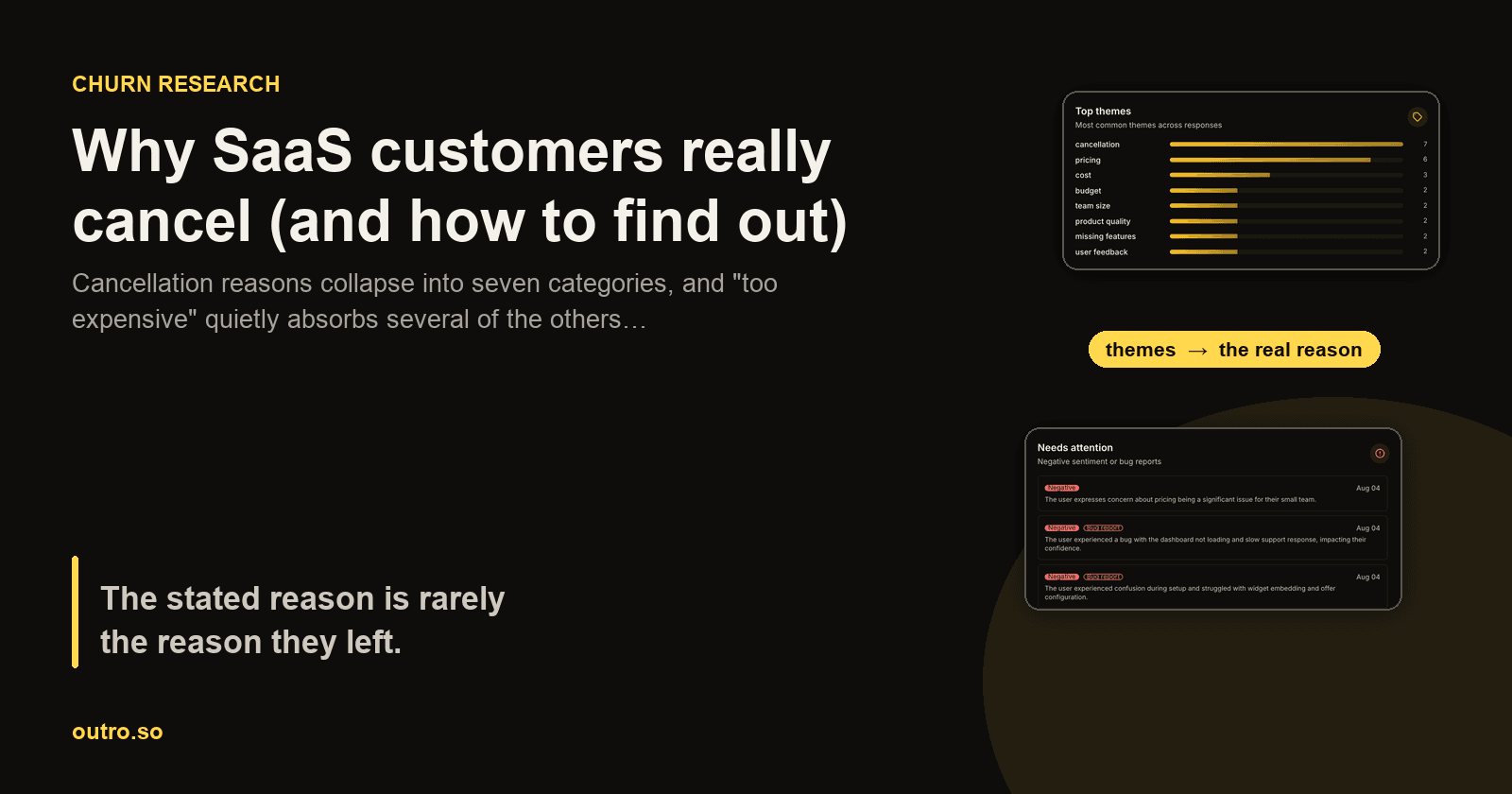
Categories tell you how churn distributes. Themes tell you what to do on Monday. Outro extracts themes across responses and counts them.
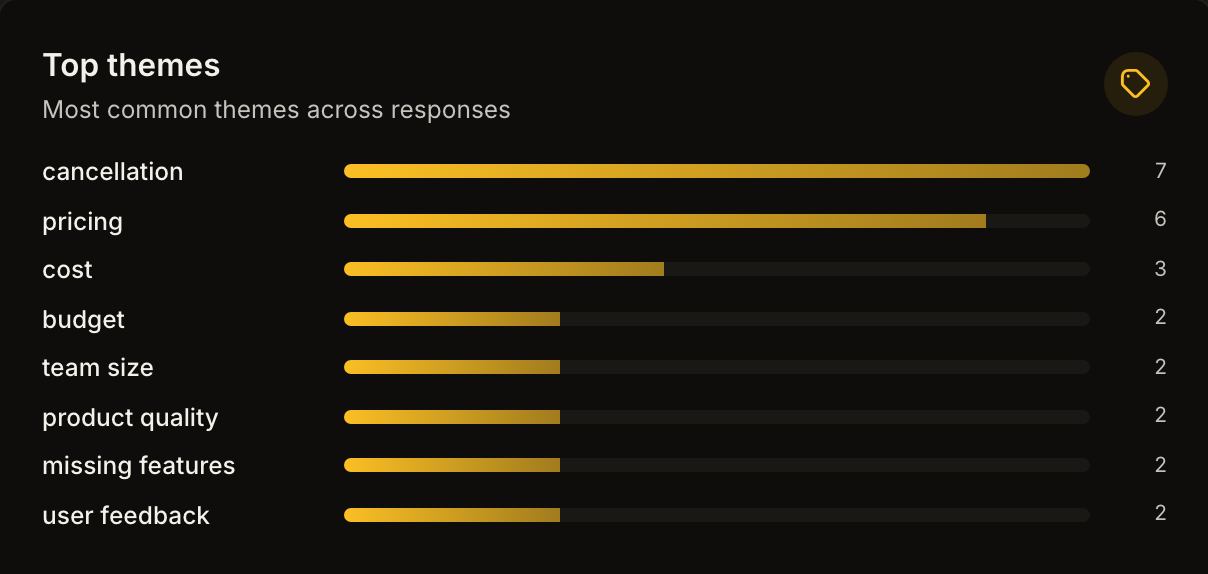
These are the real counts from that run, with cancellation at 7, pricing at 6, cost at 3, budget at 2, team size at 2, product quality at 2, missing features at 2, and user feedback at 2.
Be clear about what this is and is not. This is sixteen responses on a test account, nine spoken and seven typed. The counts are real and the theme extraction is real, but sixteen responses cannot tell you whether pricing complaints are rising, and a chart will happily draw a confident-looking slope through them anyway. Saying so plainly is more useful than the slope, and if you are evaluating any churn tool, sample size is the claim to press hardest on.
What the counts do demonstrate is the mechanism. Pricing, cost, budget, and team size appear as four separate themes rather than one. A dropdown would have merged all four into "too expensive". Split apart, they read as a coherent story about small teams facing a steep tier jump, which is exactly what the original spoken sentence said. The themes recovered the structure the category destroyed. Once you have that, reducing churn becomes a ranked list of fixes rather than a guess, and you can put numbers on what each fix is worth with the churn calculator.
Matching the offer to the reason instead of to the click
Knowing the reason during the cancellation, rather than a week later in a report, means the offer can respond to it. In the run above, the offer served after the price objection was "50% off for 3 months".
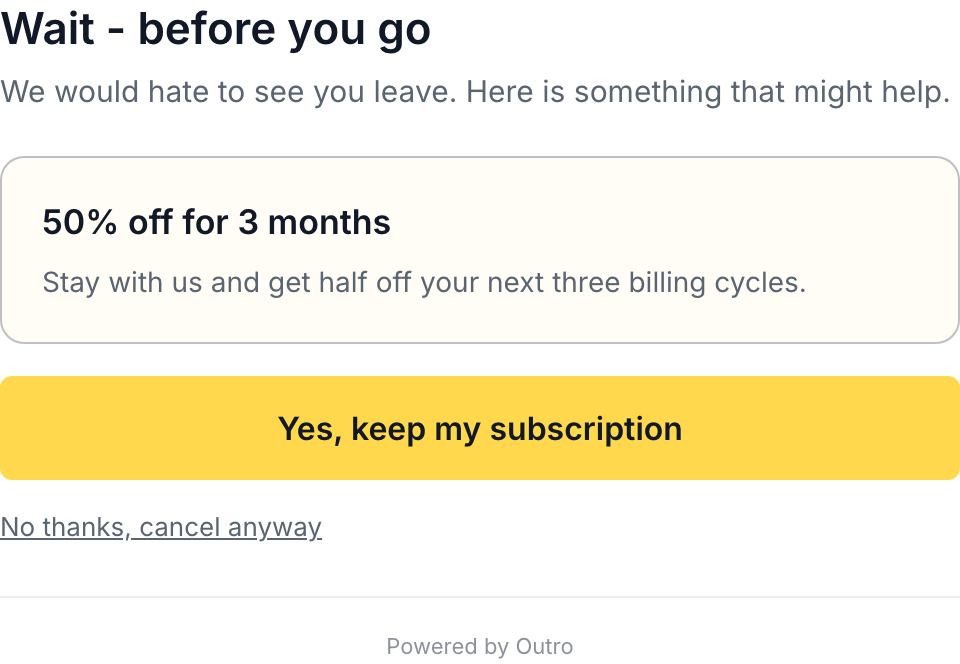
Two things to notice on that screen. The offer appears before the cancellation completes, while the intent to leave is still soft. And "No thanks, cancel anyway" stays visible and plain. Any lift you get from hiding the exit comes back as chargebacks, support load, and public complaints. Cancellation flow examples covers where that line sits in practice.
Recovery is counted conservatively. A save only counts after a 14-day grace window has passed and only if the subscription is still live at that point. A customer who accepts a discount and cancels a week later is not a save, and the number does not pretend otherwise. The alternative, counting the click on the offer, produces a save rate that looks impressive and predicts nothing.
The churn category no cancellation flow can see
There is a seventh reason, and it sits outside the taxonomy entirely because it never reaches the flow. Involuntary churn is the subscription that ends because a card expired, a payment failed, or a bank declined a charge. The customer did not decide to leave. They never clicked cancel, so they never saw a cancel page, never answered a question, and never appeared in any of the screenshots above.
Outro does not address this. It does not do failed-payment recovery and it does not do dunning. That is a hard boundary, not a roadmap item to read between the lines of. If involuntary churn is your problem, the fix belongs at the billing layer, and Stripe's revenue recovery tooling is the right place to look. Solve it separately, and do not let a voluntary-churn tool convince you your churn is understood when a slice of it never entered the flow.
Common mistakes
- Reading the reason distribution as the truth : if the distribution comes from a dropdown, price is overstated by construction. Treat it as a measure of which label was least awkward to click, not of why people left.
- Discounting in response to a price category : the spoken sentence in this article looks like a discount case and is actually a tier-structure case. Read a handful of verbatim responses before changing a price.
- Conflating churn reason with feedback type : Bug report is not the same as technical issues, and the two systems answer different questions, so collapsing them into one throws away signal.
- Drawing trends from thin data : sixteen responses is a mechanism demo, not a trend. Wait for real volume before acting on the shape of a chart, including the charts above.
- Counting the offer click as a save : without a grace window and a live-subscription check, a save rate measures button clicks rather than retained revenue.
- Hiding the cancel link to lift the save rate : this converts a cancellation into a chargeback and a complaint, and it is the fastest way to make your cancellation flow a liability.
- Expecting a cancellation flow to cover involuntary churn : failed payments need billing-side retries, and no exit interview will ever see them.
- Writing a survey with more than a handful of options : every extra option adds a translation step for the customer and a bucket you will never act on. The exit survey question templates are shorter than most teams expect for this reason.
Getting the answers out of the dashboard
One practical constraint to plan around. Outro's egress today is a weekly digest email that arrives on Monday, plus CSV export. There is no public REST API, no webhooks, no npm package, no Zapier, n8n, or Make connector, and no Slack integration.
That shapes the workflow. You cannot pipe a cancellation into your own alerting or fan responses into a Slack channel automatically. What you can do is read the Monday digest as a standing agenda item and pull the CSV when you want to join responses against your own billing data. For a small team that is usually enough. If your process depends on event-driven automation, know it now rather than after you have designed around it.
Where this leaves you
The categories are not the insight, they are the index. Their job is to make cancellations countable, and counting is genuinely useful, since you cannot prioritize what you cannot compare. But every one of the six is a container for several different situations, and "too expensive" is the largest and most misleading of them. The work is keeping the sentence attached to the category, so that when the price bucket fills up you can tell whether you are looking at a discount problem, a tier-structure problem, an onboarding problem, or a customer whose budget was cut by someone who never used your product at all.
Outro is cancellation-flow software with voice exit interviews, built for self-serve SaaS billing on Stripe or Lemon Squeezy. It replaces the cancel button with a short spoken question, transcribes and classifies the reason, and shows a matched save offer before the cancellation goes through. There is a free tier at $0, then Starter at $29 a month, Pro at $79, and Scale at $199. Every screenshot in this article is real output from the product rather than a mockup, including the theme counts and the single-day caveat that comes with them.
Hear why your customers really cancel
Outro captures voice exit interviews on your cancel page, detects the real reason with AI, and shows the save offer most likely to keep them.
Start free trial